

Trading on a Limited Schedule: Timeframes and Routines That Fit Your Day
How to choose the timeframe based on the time you have, what changes in the stop and the lot size, how to use pending orders and alerts in MT5 and an example of a weekly routine that fits around a job.
Many people trade with the time left over by work, studies and family. The problem appears when the method requires being in front of the screen at hours you do not have: you end up trading in snatches, from your phone or outside the plan. The solution is not to find more time, but to choose a way of trading that fits the time you have. This article explains how.
1. Start with time, not with the method
Before choosing a strategy, it is worth answering two questions:
- How much time do you have each day, and at what time? Half an hour fixed in the morning is not the same as scattered moments.
- Does that time match the session you want to trade? If you work afternoons, the Wall Street open is not your schedule, however much you like it.
The timeframe is chosen from those answers. If the method does not fit your schedule, it is the method that has to change.
2. Timeframe by available time
| Timeframe | Checks needed | Approximate time | Suits |
|---|---|---|---|
| M5 – M15 | Continuous monitoring during the session | 2 – 4 hours in a row | Those who can commit the whole session |
| H1 | Several times during the session | 1 – 2 hours | Those with a fixed daily time slot |
| H4 | 2 – 3 times a day | 20 – 40 minutes | Those who work but can check before, during and after |
| D1 | Once a day, at the close | 15 – 30 minutes | Those with only one fixed slot a day |
| W1 | Once a week | 1 hour at the weekend | Those with hardly any time during the week |
Indicative values. They depend on the number of assets and the method.
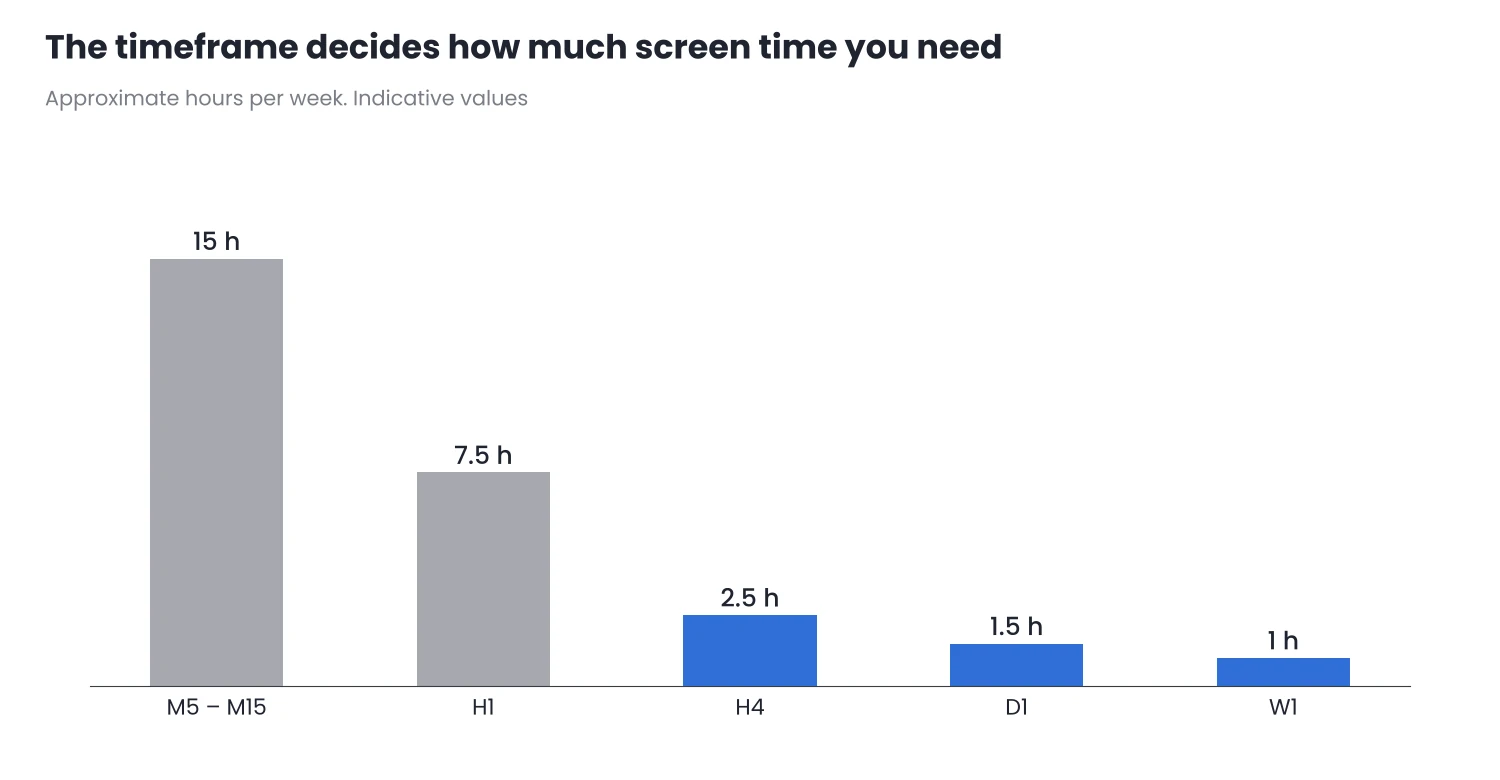
Figure 1. Moving from M15 to D1 cuts screen time from hours to minutes a day.
What changes in the stop and the lot
On higher timeframes, moves are larger and the stop needs more distance. That does not mean more risk: if the lot is sized from the risk and the distance to the stop, a stop twice as wide takes a lot half as large, and the loss at the stop is the same. To calculate it you can use Zone Risk Planner or its free version, Zone Risk Planner Core, which do not open or close trades.
What does change is that trades last longer: days instead of hours. You need to account for swaps and weekends, as I explain in Leverage and Margin in CFDs.
3. Let MT5 watch for you
With little time, the platform has to do part of the work:
- Pending orders with stop and target. If your entry is a specific level, a limit or stop order with its stop loss and take profit already set saves you from watching. Give them an expiration so they do not trigger days later in another context. I explain how each one works in Order Types in MT5 and Slippage.
- Price alerts. In the Alerts tab of the Toolbox you can create alerts for when the price reaches a level. That way you only look at the chart when something happens.
- Mobile notifications. Under Tools → Options → Notifications, with the MetaQuotes ID from the MT5 mobile app, alerts reach your phone. They are useful for staying informed; decisions are better made in front of the chart.
Keep in mind where each thing runs. Pending orders, stop loss and take profit sit on the broker’s server and remain active even if you close MT5. Alerts and the built-in trailing stop, however, run in your terminal: if you close it, they stop working. To keep them active, the terminal has to stay open, for example on a VPS.
4. An example weekly routine
| When | Duration | What you do |
|---|---|---|
| Sunday | 45 minutes | Review daily and weekly charts, mark zones and decide which assets to watch this week |
| Each day, before work | 15 minutes | Check whether any zone is close, place or cancel pending orders and alerts |
| Each day, at the close | 15 minutes | Review open positions, move the stop if the plan says so and update the journal |
| First weekend of the month | 1 hour | Review the journal and the plan |
Illustrative example. Adjust the times to your schedule and to your assets’ sessions.
To keep those reviews quick it helps to have a clean chart and to mark zones without wasting time. Chart Sweeper helps you clean up the chart before the review, SnapDraw lets you draw zones and levels with fewer clicks and ATR Volatility Monitor shows whether each asset’s volatility is high, normal or low. None of them opens or closes trades or gives signals.
5. What to avoid
- Trading timeframes shorter than your availability. If you can only look twice a day, an M15 system turns into open trades with no one watching.
- Making decisions on your phone in spare moments. The phone is for noticing an alert, not for analysing a chart.
- Leaving positions without a stop because “I’ll check later”. With little time, a stop on the server is essential.
- Ignoring the calendar. If you will not be in front of the screen when a major release comes out, decide beforehand what to do with open positions.
Automating with an EA is another option, but it also takes time: you have to check that it keeps working, as I explain in the EA series on the MQL5 blog, in Is Your EA Still Working?.
Conclusion
- Your schedule decides the timeframe, not the other way round. If the method does not fit your time, change the method.
- Higher timeframes need wider stops, but not more risk, if the lot is sized from the risk.
- Pending orders, alerts and a fixed routine let you trade with a few minutes a day without being tied to the screen.
Write down your routine with specific times this week and test it for a month on a demo account before trading it live.
Want to bring this to your chart?
Jasopex tools for MetaTrader help you plan your risk before you trade.
See the tools