

Order Types in MT5 and Slippage
What each order type does in MT5, why a limit order is not filled even though the chart touches it, when slippage appears and how to reduce it.
A strategy can be well designed and still lose part of its edge in execution: an order that is not filled, a stop that is filled further away than planned or a market entry just as the spread widens. Knowing how each order type works in MT5 avoids many of these problems. This article explains what each one does, which price triggers it and when slippage appears.
1. Market orders
A market order is filled at the best price available at that moment: buys at the Ask price and sells at the Bid price. It is the only order with immediate execution, but it does not guarantee the price you see on screen. Between the moment you click and the moment the order reaches the server, the price can move.
What happens in that case in MT5 depends on the symbol’s execution mode, which you can see in its Specification (right-click in Market Watch):
- Instant execution: you can set a maximum deviation in points. If the price has moved further, you get a requote and decide whether to accept the new price.
- Market execution: the order is filled at the available price, whatever it is. There are no requotes, but there is no deviation limit either.
2. Pending orders
Pending orders wait for the price to reach a level. MT5 has six of them:
| Order | Where it is placed | What it waits for |
|---|---|---|
| Buy Limit | Below the price | Buying cheaper, on a pullback |
| Sell Limit | Above the price | Selling higher, on a bounce |
| Buy Stop | Above the price | Buying if the price breaks higher |
| Sell Stop | Below the price | Selling if the price breaks lower |
| Buy Stop Limit | Above the price | When the stop level is reached, places a Buy Limit below it |
| Sell Stop Limit | Below the price | When the stop level is reached, places a Sell Limit above it |
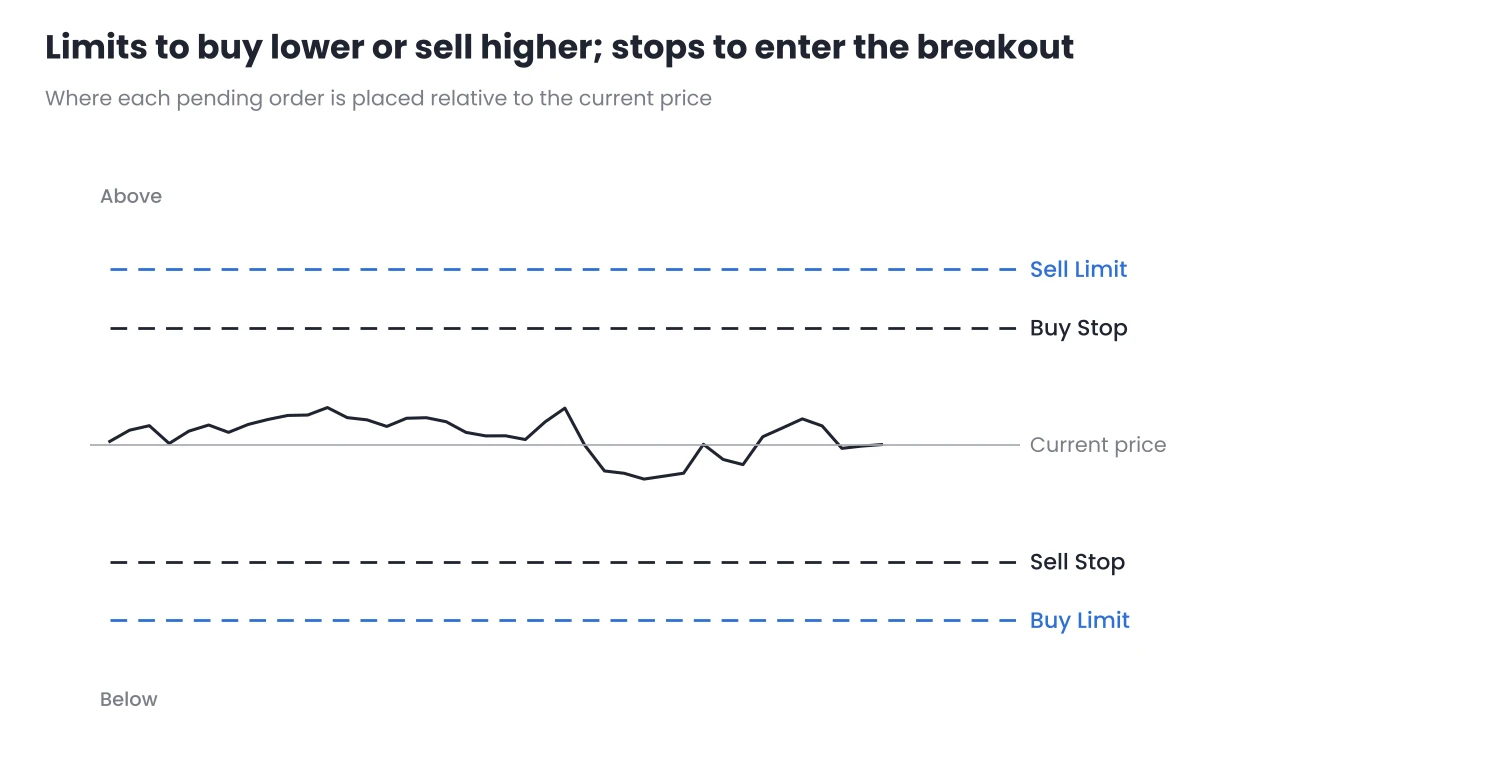
Figure 1. Where pending orders are placed relative to the current price.
The important difference is how they are filled:
- Limit orders are filled at their price or better. They do not suffer adverse slippage, but they may not be filled if the price reaches the level exactly and turns around.
- Stop orders become market orders when the level is reached. They are almost always filled, but possibly at a worse price, especially in fast breakouts.
- Stop limit orders combine both: they only enter if the price has not moved too far from the stop level. They avoid entries with heavy slippage, at the cost of missing some trades.
Expiration
When you create a pending order you can choose how long it stays valid: until you cancel it, only for today, or until a specific date and time. If your strategy only makes sense in one session, an expiration prevents the order from triggering hours later in a different context.
3. Bid, Ask and the order that was “touched” but not filled
By default, MT5 charts are drawn with the Bid price. But buy orders are triggered by the Ask, which is higher by the size of the spread. That is why it is common to see the chart price touch your Buy Limit while the order is not filled: the Bid reached the level, but the Ask did not.
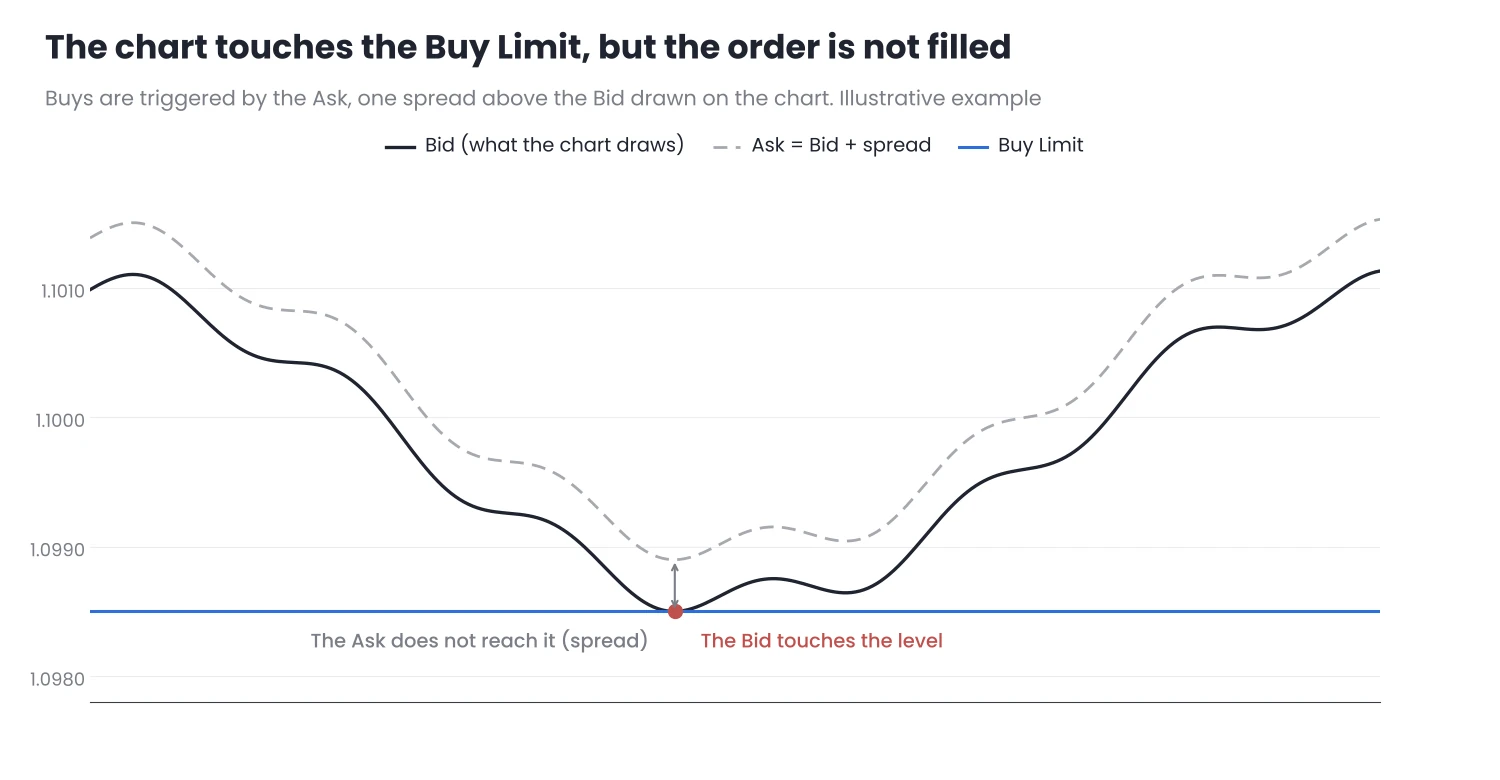
Figure 2. A Buy Limit is triggered by the Ask, not by the Bid drawn on the chart.
The same happens with exits:
- A buy position is closed at the Bid, so its stop loss and take profit are triggered by the Bid.
- A sell position is closed at the Ask, so its stop loss and take profit are triggered by the Ask. A stop on a sell can be hit even if the chart has not reached the level, if the spread widens.
To see this on the chart, open its Properties (F8) and enable Show Ask line. You will see both prices and understand why an order is filled or not.
4. Slippage: when it appears
Slippage is the difference between the price you requested and the price at which the order was filled. It can be positive or negative, and it appears mainly at these times:
- Economic data and news: for a few seconds there are few orders in the market and the price jumps.
- Session and weekly opens: if there is a gap, a stop order is filled at the first available price, which can be far from the level.
- Low-liquidity hours: for example, around the server’s day change, when the spread also widens.
Example on an index
| Planned | Filled | Difference | |
|---|---|---|---|
| Entry with Buy Stop | 20,000 | 20,006 | 6 points against |
| Stop loss | 19,950 | 19,938 | 12 points against |
| Total loss | 50 points | 68 points | 36% more than planned |
Illustrative example, during a data release. The values do not correspond to any real market.
In this example, the trade risked 50 points and lost 68. If the lot was sized to risk 1%, the real loss was 1.36%. Occasional slippage is not a problem; frequent slippage changes the real risk of the strategy. I cover execution costs in backtests in Hidden Costs in Your Backtests, on the MQL5 blog.
5. How to reduce execution problems
- Choose the order to match the idea. If you want to buy a pullback, use a limit. If you want to enter a breakout, use a stop and accept some slippage, or a stop limit if you prefer to miss the trade rather than enter badly.
- Avoid entering at market in the first seconds of a release. If your strategy does not depend on news, wait for the spread to return to normal.
- Check the execution mode and filling type in each symbol’s Specification. They differ between brokers and between assets.
- Show the Ask line when you trade buy limit orders or sell positions.
- Compare the requested price with the filled price in your history. If adverse slippage is common, include it in your risk calculation and in your backtests.
Conclusion
- Limit orders control the price, but not the fill. Stop orders almost always guarantee the fill, but not the price. Stop limit orders sit in between.
- The chart shows the Bid. Buys are triggered by the Ask and sells are closed at the Ask, so the spread decides whether an order is filled or a stop is hit.
- Slippage concentrates around news, opens and low-liquidity hours. Measuring it in your history tells you how much your real risk changes.
Before your next trade, open the symbol’s Specification, check its execution mode and enable the Ask line on the chart. Try it first on a demo account to see how your orders behave.
Want to bring this to your chart?
Jasopex tools for MetaTrader help you plan your risk before you trade.
See the tools