

ATR from Scratch (5/6): The Stop and the Position Size
Fifth episode of the ATR series: how much room the stop needs depending on volatility, how to calculate the lot size to always risk the same amount and what to do when ATR changes.
We have reached the use that makes ATR a cornerstone. In the previous episodes we saw what it measures, how it is calculated and how to tell whether its value is high or low. In this one we apply it to two decisions in every trade: where to put the stop and how many lots to open. If you already have experience and want to go further, I cover this in more detail in my post ATR Volatility: Adapting Stops and Risk to Each Asset on the MQL5 blog. Here I explain it from scratch.
1. The stop needs room
Think of an umbrella. For a drizzle a small one will do; for a windy storm you need a big one. Choosing the umbrella without checking the weather is the surest way to get wet.
The stop works the same way. If the price normally moves 40 points in an hour and you put the stop 15 points away, it will most likely be hit by pure noise, even if your idea was good. ATR tells you how much it “rains” on that asset.
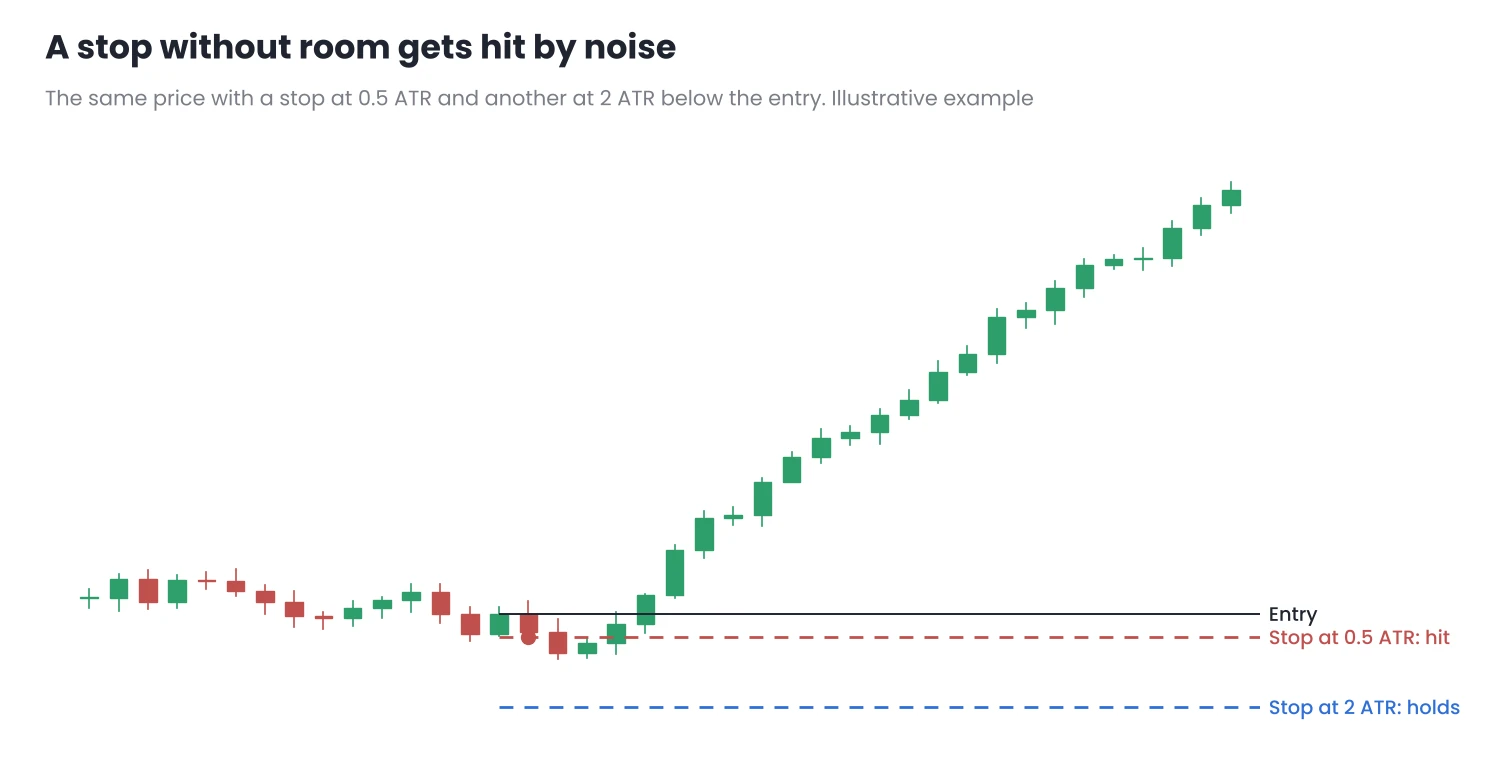
Figure 1. A stop smaller than the asset’s normal movement gets hit by noise; one sized to ATR lets the trade breathe.
2. How much room to give
The most common approach is to place the stop at a multiple of the ATR on the timeframe you enter on:
Stop distance = k × ATR
- k between 1 and 1.5: tight stops. They are hit more often, but risk little distance.
- k between 2 and 3: wider stops. They handle noise better, at the cost of a larger distance.
There is no right k for everyone. It depends on the strategy and the asset, and it is worth testing, just like the ATR period in episode 2. Many people combine both ideas: they place the stop behind a relevant high or low and check that the distance is at least what ATR calls for.
3. The lot size: always risking the same
This is the part most often forgotten. If the stop changes with volatility, the lot size has to change too. Otherwise, when ATR rises, the stop moves further away and the possible loss grows without you noticing.
The formula is simple:
Lots = risk in money ÷ (stop distance × point value per lot)
Example with a €10,000 account and a 1% risk per trade (€100):
| Normal volatility | High volatility | |
|---|---|---|
| ATR (H1) | 40 points | 80 points |
| Stop at 2 ATR | 80 points | 160 points |
| Point value per lot | €1 | €1 |
| Lots | 100 ÷ (80 × 1) = 1.25 | 100 ÷ (160 × 1) = 0.62 |
| Loss if the stop is hit | €100 | €100 |
Illustrative example. The point value per lot depends on the asset, the broker and the account currency.
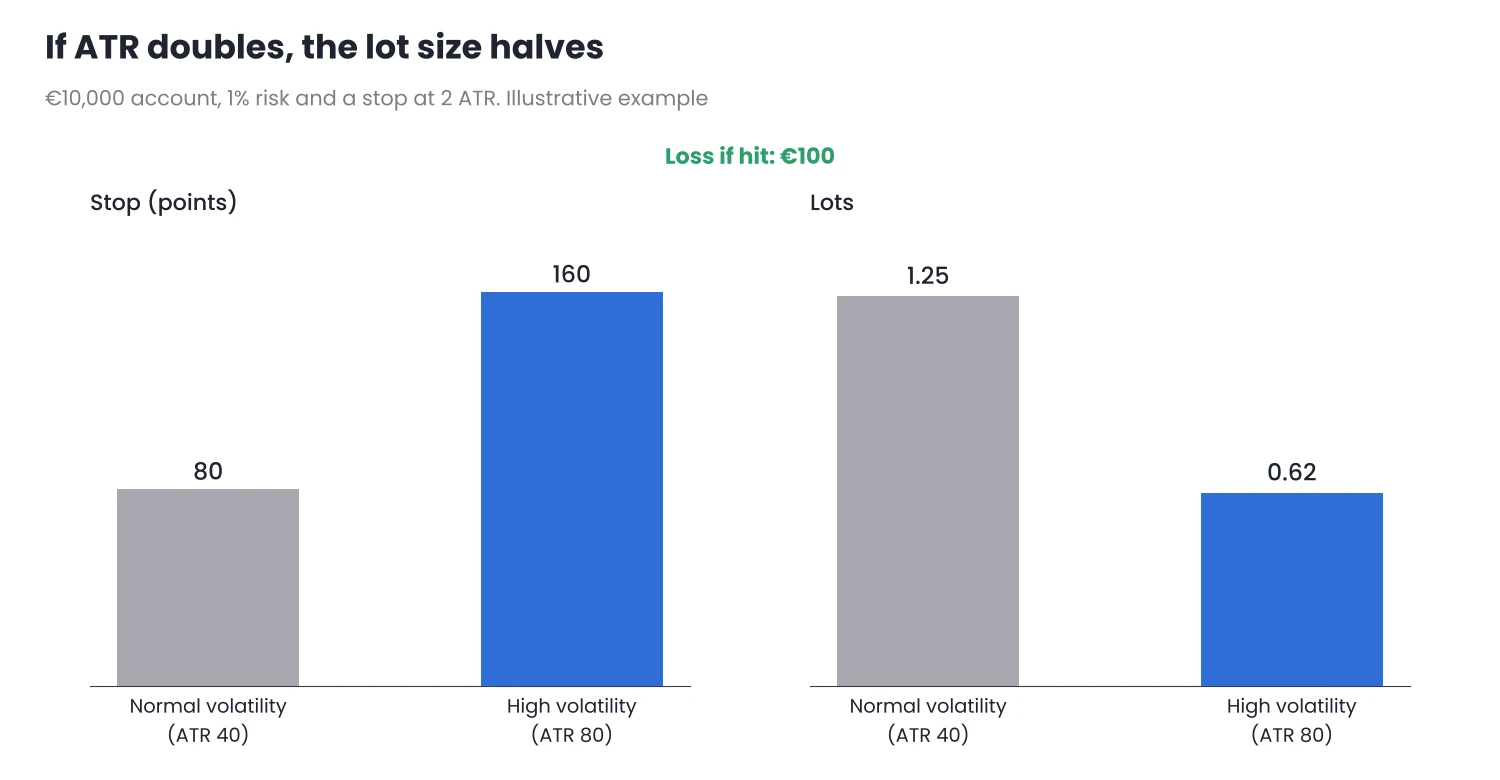
Figure 2. When ATR doubles, the stop doubles and the lot size halves: the risk does not change.
So volatility decides where the stop goes, and your risk rule decides how much you can lose. The lot size is what fits one to the other.
4. Details that matter
- Always round down. If the calculation gives 0.627 lots and the broker allows steps of 0.01, open 0.62, not 0.63.
- Respect the minimum lot. If even the minimum lot exceeds your risk with that stop, the trade does not fit your plan. The right thing is not to take it, not to tighten the stop.
- The stop does not guarantee the price. In a gap or on news it can be filled further away. I explain this in Total Open Risk and a Monthly Loss Limit.
- Use the ATR of the timeframe you enter on. A stop calculated with the daily ATR for a fifteen-minute trade makes no sense, and vice versa.
5. In MetaTrader
- The point value comes from the symbol specification: in the Market Watch window, right-click the asset and choose Specification. It shows the contract size and the tick value. It works the same in MT4 and MT5.
- The ATR of the entry timeframe can be read in the indicator window or in the Data Window (Ctrl + D).
- In MT5, Zone Risk Planner calculates the lots that match your risk from the entry and the stop, and ATR Volatility Monitor draws an ATR-based trailing stop. Neither opens or closes trades or gives signals.
Conclusion
- The stop needs room proportional to volatility: a multiple of the ATR of the entry timeframe.
- The lot size is calculated from the risk and the stop distance. If ATR rises, the stop moves further away and the lot size falls, and the risk stays the same.
- Round down, respect the minimum lot and remember that the stop does not guarantee the price.
In episode 6, the last one, we will see how to use the daily ATR to know how much room the session has left.
Want to bring this to your chart?
Jasopex tools for MetaTrader help you plan your risk before you trade.
See the tools