

Market Sessions and Server Time in MT5
Why MT5 charts do not show your time, how to work out the difference with your broker's server, what happens in the daylight saving transition weeks and when each market moves.
MT5 charts do not show your time, but your broker’s server time. If you do not know the difference, it is easy to mistake the DAX open for an ordinary candle, set the wrong time filter on an EA or expect volatility at an hour when the market is quiet. This article explains how to find out which time your broker uses, what changes in the daylight saving transition weeks and when each market moves.
1. Server time
Each broker chooses the time zone of its server, and everything you see in MT5 uses that time: the chart axis, the close of daily candles and the open and close times of your trades in the history.
How to find out which one your broker uses
In the Market Watch window, the header shows the current server time. Compare it with your clock:
Difference = server time − your local time
Many brokers use GMT+2 in winter and GMT+3 in summer. That way, 00:00 server time matches 17:00 in New York, the usual end of the trading day in forex, and the week has five daily candles. Others use GMT+0, and then a small Sunday candle appears with the first hours of the week.
Why the Sunday candle matters
A Sunday daily candle, only a few hours long and with little movement, distorts everything calculated on the daily chart: the daily ATR drops, moving averages count an extra day and levels calculated from the previous day’s high and low come from a candle that means almost nothing. If your broker has a Sunday candle, keep it in mind when you compare daily indicators with another platform.
2. The daylight saving transition weeks
Europe and the United States do not change their clocks on the same day. The United States moves its clocks forward on the second Sunday of March and back on the first Sunday of November. Europe does it on the last Sunday of March and the last Sunday of October. Between those dates there are about three weeks in March and one week between October and November in which the time difference across the Atlantic is one hour shorter.
If your broker’s server follows New York time (GMT+2/GMT+3), its difference with Central European time, normally one hour, becomes two hours during those weeks.
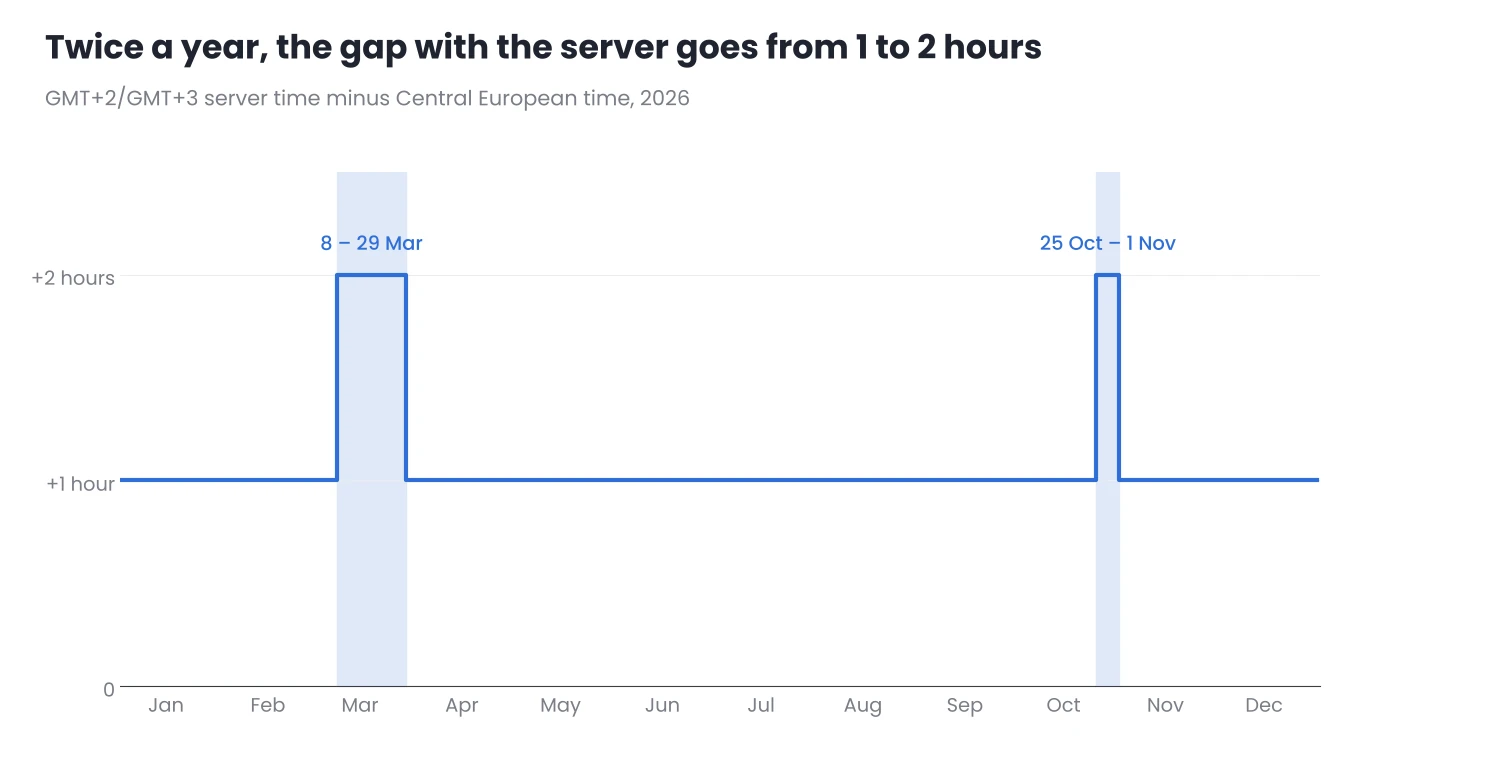
Figure 1. Difference between a GMT+2/GMT+3 server and Central European time during 2026.
This has practical consequences:
- For a trader in Europe, the US session starts one hour earlier. The Wall Street open moves from 15:30 to 14:30 CET, and US data released at 8:30 New York time comes out at 13:30 instead of 14:30.
- In server time, it is Europe that moves. With a GMT+2/GMT+3 server, the Wall Street open is always at 16:30 server time. The DAX open, however, moves from 10:00 to 11:00 server time during those weeks.
- EA time filters can end up shifted. An EA that trades the DAX open with a fixed filter in server time will enter one hour earlier than planned in those weeks. Review your time filters every March and every October.
3. When each market moves
Index CFDs and currencies trade almost 24 hours a day, but movement is concentrated in the hours when the reference market opens. These are approximate times in winter, outside the transition weeks:
| Session or event | CET | UTC | What moves |
|---|---|---|---|
| Tokyo | 01:00 – 10:00 | 00:00 – 09:00 | Yen, Nikkei, gold on lower volume |
| European open | 09:00 | 08:00 | DE40, EU50, European currencies |
| US data | 14:30 (most releases) | 13:30 | Everything, for a few minutes |
| Wall Street open | 15:30 | 14:30 | US500, US100, US30, dollar |
| Europe – US overlap | 15:30 – 17:30 | 14:30 – 16:30 | Usually the highest-volume period for EURUSD and DE40 |
| Wall Street close | 22:00 | 21:00 | US indices |
Approximate times. Forex sessions have no official open or close. In summer, European and US times stay the same in local time but are one hour earlier in UTC; Tokyo does not change its clocks.
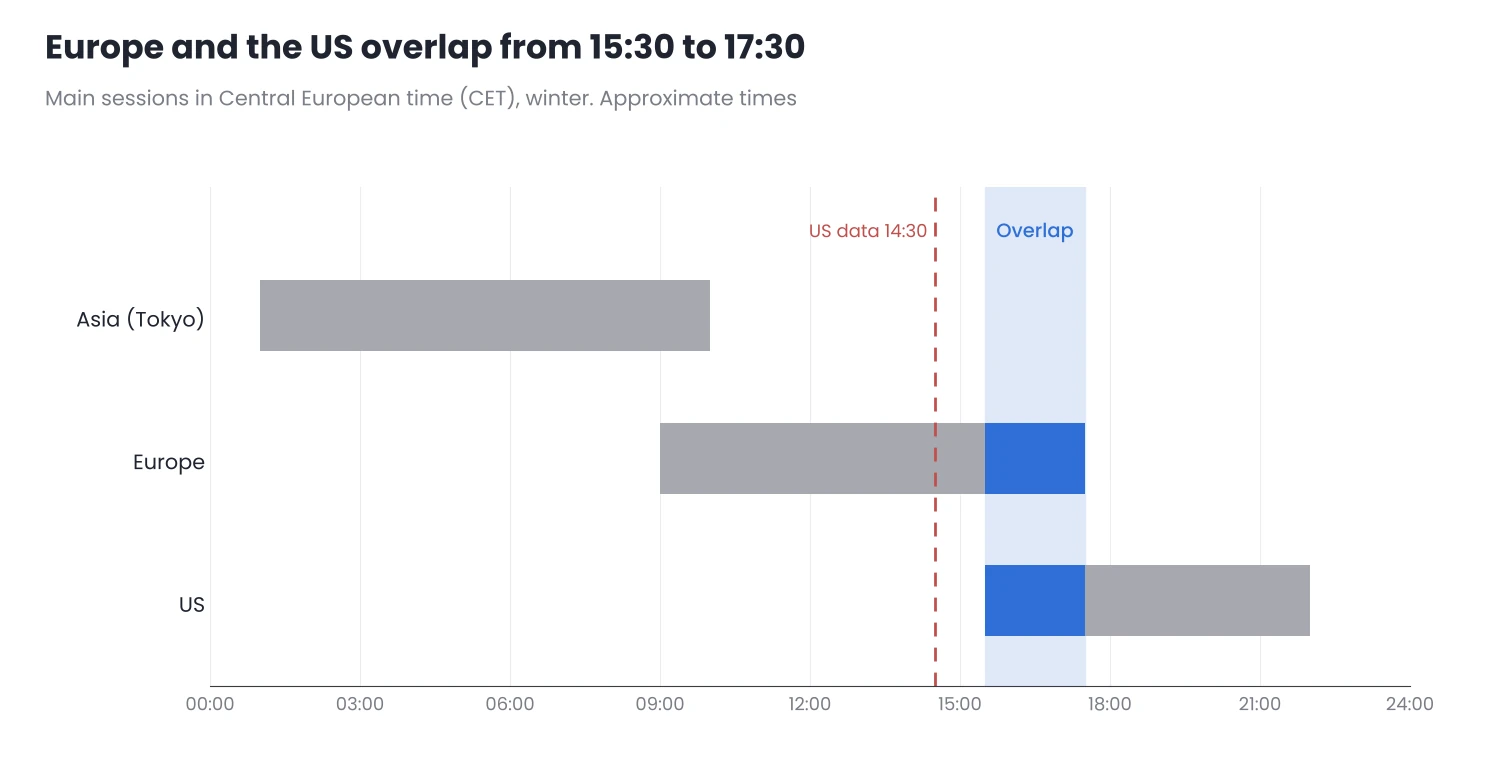
Figure 2. Main sessions in Central European time (winter).
The CFD’s own trading hours
Each CFD also has its own quoting hours and daily breaks, which depend on the broker. To see them in MT5, right-click the symbol in Market Watch and choose Specification. It shows the quote and trade sessions for each day of the week, in server time. It is worth checking them before trading a new asset, especially if you plan to leave pending orders or an EA running overnight.
4. Volatility changes with the hour
The same asset does not move the same way at 04:00 as at 16:00. A stop or target that fits the volatility of the Wall Street open can be too wide for the Asian session, and the other way round.
- Measure volatility in the time window you trade. An H1 ATR calculated over the whole day mixes quiet and active hours.
- Compare current volatility with the usual level before entering. For this you can use ATR Volatility Monitor, which shows the asset’s ATR and whether its volatility is high, normal or low compared with usual. It only displays data: it does not open or close trades or give signals.
- Keep the server’s day change in mind. Around 00:00 server time (23:00 CET with a GMT+2/GMT+3 server) liquidity drops and spreads usually widen for a few minutes, which matters if you hold open trades with a tight stop.
5. A simple routine
- Write down the difference between your time and server time and keep it at hand. Check it again in the transition weeks of March and October.
- Check the economic calendar in your local time and convert it to server time before looking at the chart.
- Write your EAs’ time filters in server time and note which session they are designed for, so you can review them when the clocks change.
- Before trading a new asset, open its Specification and check its trading hours and breaks.
Conclusion
- MT5 works in server time, not yours. Work out the difference once and check whether your broker has a Sunday candle.
- The transition weeks shift the sessions. For a few weeks in March and one week between October and November, the difference with the United States changes and time filters can end up shifted.
- Volatility depends on the session. Movement is concentrated around the opens and the overlap between Europe and the United States, and stops should fit the time window you trade.
Before your next trade, open Market Watch, check the server time and work out which hour on your clock the candle you are analysing corresponds to.
Want to bring this to your chart?
Jasopex tools for MetaTrader help you plan your risk before you trade.
See the tools